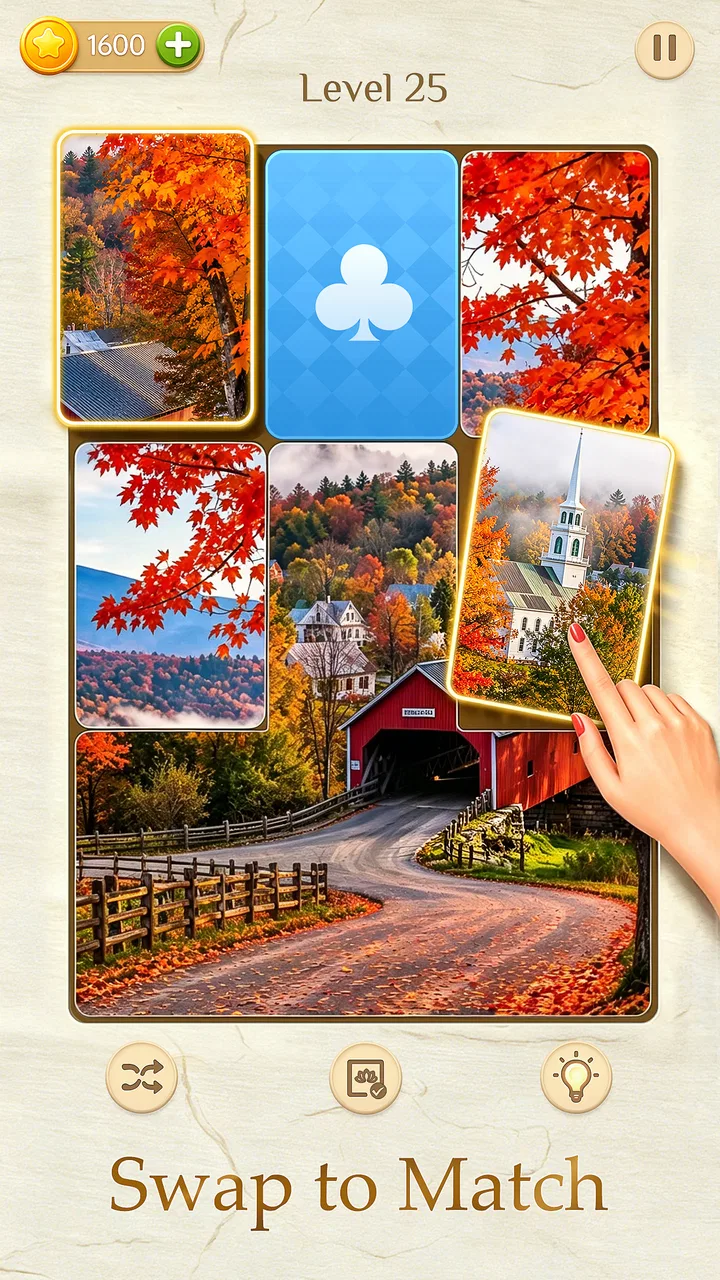
Jigmatch - Solitaire Puzzle
- 4.9
- Rating
- 10.00K
- Installs
- Free
- Price

 Analysis by App-foxy
I spent time with Jigmatch - Solitaire Puzzle because its central idea is more interesting than a standard jigsaw game: it places picture assembly and solitaire-style card play in the same casual package. That combination changes the rhythm from simply searching for matching pieces to switching between two familiar kinds of concentration. In my experience, that is the game’s main appeal. It gives me a way to enjoy a puzzle when I want to focus on an image, then move into a more methodical card session when I need a change of pace.
Developed by Metajoy, this free board game is aimed at a broad audience and carries an Everyone content rating. It is available for Android devices running version 7.0 or later, so it can suit older phones as well as newer ones. The current version is 1.0.29, and the game has reached over ten thousand installs with a 4.9 average from around 1.9 thousand ratings. Those figures suggest that its simple format is connecting with players, although I would still judge it mainly by whether the combined puzzle structure matches your habits.
Why the jigsaw-and-solitaire combination matters
The most important capability here is not just the amount of puzzle material. It is the way two different activities share the same game. A conventional jigsaw app usually asks me to settle into one visual task: identify edges, recognize colors, and gradually complete a picture. A solitaire game, by contrast, is more about order, available moves, and planning several steps ahead. Jigmatch - Solitaire Puzzle brings those moods together, which makes the experience feel less repetitive during longer sessions.
You May Also Like

 AccuWeather: Weather Radar
AccuWeather Review: A Quick, Clear Forecast for Everyday Decisions
For everyday plans, the best forecast is the one you can understand quickly. AccuWeather makes rain timing, radar, and local conditions easy to act on, with a few trade-offs.

 Hill Climb Racing
Why Hill Climb Racing Still Turns Crashes Into One More Run
A tiny car, a bumpy hill and one more upgrade: Hill Climb Racing keeps resurfacing because its simple chaos makes every near-miss feel personal.

 AliExpress - Shopping App
AliExpress Makes Global Shopping Feel Personal, but Shoppers Bear the Risk
AliExpress turns a global marketplace into a pocket-sized discovery engine. Its reach is useful, its shopping loop compelling, and its trade-offs easy to miss.

 Lords Mobile: Kingdom Wars
Lords Mobile Is a Kingdom-Building Routine, Not a Quick Match
A case-by-case verdict on the building, battles, device demands, and social commitments that make Lords Mobile rewarding for some players and exhausting for others.

 PDF Scanner app - TapScanner
TapScanner Makes Paperwork Easier to Capture, Check, and Share
TapScanner makes scanning with a phone feel less like a rescue operation and more like a dependable step in getting work done. Its capture tools are useful, though not flawless.

 Block Blast!
 Shows How Much a Puzzle Game Can Leave Out
A quiet grid game shows why puzzle players increasingly value instant clarity, repeatable skill and low-pressure play—and where the genre still needs to catch up.
More From Our News Desk
View All News


That distinction matters in everyday use. If I open a normal jigsaw game while tired, I may enjoy the first few minutes but eventually feel that every new puzzle demands the same kind of attention. Here, the card side offers a mental reset without requiring me to leave the app. I can move from visual sorting to a more structured sequence of decisions, then return to the picture when I feel ready. It is a small design choice, but it gives the game a broader range of relaxing moments than a single-mode board title.
The large puzzle library is also part of that appeal. The game presents itself as offering more than twenty thousand high-definition jigsaw puzzles, which creates the impression of a long-running collection rather than a short set of boards that I would finish quickly. I would not treat that figure as a promise that every image will suit my taste, but it does make the app more practical for repeat use. A casual player can dip in occasionally, while someone who enjoys routine puzzle sessions has a much deeper pool to explore.
What I like most is that the two activities serve different energy levels. The jigsaw side is better when I want to look closely and let progress happen gradually. The solitaire side is more suitable when I want each move to feel immediate. That makes the combined format more flexible than choosing between two separate apps, especially for short breaks when I do not want to decide what kind of game to launch.
How the two modes feel during a normal session
In practice, I approach the jigsaw boards as a visual organization exercise. I begin by looking for obvious edges and distinctive colors, then use recognizable shapes or image details to narrow down where pieces belong. On a high-definition picture, small visual clues can be satisfying, but they can also make the board demanding when several areas share similar tones. I find it helpful to pause before placing a questionable piece rather than forcing it into a nearly correct location. That habit reduces the frustration that comes from repeatedly testing the same area.
The card side creates a different pace. Instead of scanning an image for relationships, I think about which available move keeps the board open. The useful mindset is to avoid treating every legal move as equally good. A move that looks productive immediately may remove an option I need later, while a less obvious move can preserve more flexibility. This is where the solitaire element adds genuine variety rather than acting as a decorative extra.
Switching between the modes is most effective when I use each one for a clear purpose. I do not jump back and forth after every small action. I prefer to spend a few minutes on the jigsaw, stop at a natural point, and then use the card game as a separate mental block. That approach makes the combined design feel intentional. If I constantly change activities without finishing a thought, the variety can become distracting instead of refreshing.
One useful personal routine is to use the picture puzzle for slow concentration and the card game for a short, decisive break. For example, after a few minutes of assembling a detailed image, I may switch to solitaire when I want a quicker sense of progress. Later, I can return to the unfinished picture without feeling that I have abandoned the session. This is a more practical use of the dual format than simply calling it “two games in one.”
A realistic use case for short breaks
Imagine having a quiet ten-minute break during the day. A large jigsaw board may be too involved to complete, but it can still provide a calming start if I focus on one recognizable section. When my attention begins to wander, the solitaire activity gives me a more compact challenge. I can make a few deliberate decisions, then close the game without needing to reach a dramatic ending. That makes the app a good fit for fragmented free time, provided I am comfortable leaving a picture unfinished.
It also works well for evenings when I want something more engaging than passive scrolling but less demanding than a competitive game. The board-game format keeps the focus on observation and choices rather than speed or social pressure. I can take my time with a difficult image, and the card mode gives me a way to continue playing when visual assembly starts to feel repetitive. For me, that balance is more useful than a game that insists on one fixed pace.
Families may also find the Everyone rating reassuring when choosing a simple puzzle title for a shared device. Still, I would not assume that every player will enjoy both halves equally. Someone who loves image assembly may see the solitaire section as an interruption, while a dedicated card player may prefer a specialized solitaire app with deeper rules or more focused progression. The combined design is strongest for people who enjoy switching, not for players seeking the most advanced version of either genre.
Practical habits that improve the experience
My first tip is to treat the jigsaw as a sorting task before treating it as a placement task. I look for broad visual groups—sky, foliage, architecture, faces, or other recognizable areas—rather than trying to solve random pieces one at a time. This reduces the number of possibilities I hold in mind and makes the high-definition artwork more helpful instead of overwhelming. It is especially useful on images with many similar colors.
My second tip is to use the solitaire mode when I notice that I am placing pieces mechanically. That usually means I am no longer observing the image carefully. A short card session can restore attention, after which I return to the jigsaw with a clearer sense of the remaining shapes and patterns. The benefit is not that the card game solves the picture; it is that the change in mental task prevents careless repetition.
A third tip is to stop at a meaningful visual milestone. Completing a corner, finishing a distinct object, or connecting a recognizable section gives the session a natural endpoint. This is better than judging the experience only by whether the entire board is complete. Since the puzzle collection is extensive, the game is more enjoyable when I see each board as a series of small discoveries rather than a single long obligation.
For the card mode, I try to preserve options instead of chasing the most visible move. When two choices seem similar, I favor the one that exposes more of the board or keeps future moves available. This does not guarantee a successful round, but it makes my decisions feel more considered. It also highlights an important trade-off: the solitaire side is relaxing when I accept that not every position can be rescued, but frustrating when I expect every session to be perfectly solvable.
Where the game is less convincing
The combined concept does not remove the usual weaknesses of casual puzzle games. Visual assembly can become repetitive if I am not interested in the selected image, and a large collection does not automatically mean every board will feel equally fresh. High-definition artwork can be attractive, but detailed pictures may also increase the time needed to distinguish similar pieces. Players who prefer quick wins may find the jigsaw side slower than expected.
The opposite problem can appear with solitaire. A player looking for a full card-game experience may want more depth, more rule variations, or a stronger sense of long-term mastery than a hybrid app provides. Jigmatch is better understood as a flexible casual board game than as a replacement for a dedicated solitaire title. Its strength is the transition between activities, not necessarily the promise of becoming the deepest specialist game in either one.
I also think the format asks the player to manage their own session structure. The app’s value depends on using the two modes thoughtfully. If I expect the game to create a perfect flow automatically, the switching may feel unnecessary. If I deliberately use one activity to complement the other, the design makes more sense. That is an important distinction for anyone deciding whether the hybrid approach is genuinely useful or merely novel.
Another trade-off is commitment. A short card session feels naturally contained, while a jigsaw board can invite me to continue longer than planned because I am close to completing a section. That can be enjoyable, but it is worth recognizing if I am trying to use the app only for brief breaks. I find the best balance by deciding in advance whether I am opening the game for a quick card round or a slower picture-building session.
Who benefits most from this format
I would recommend Jigmatch to people who like quiet, non-competitive games but do not want to repeat exactly the same action every time they play. It suits players who enjoy visual detail, gentle problem-solving, and the option to change mental gears without opening another app. The free price also makes it easy to try without turning the decision into a commitment. Its broad age rating makes the presentation approachable, although individual preferences will still determine whether the two modes feel equally appealing.
It is particularly well suited to someone who uses games as a way to manage small gaps in the day. A commuter waiting for an appointment, a student taking a break from reading, or anyone winding down before bed can choose between a picture that rewards patience and a card activity that offers more immediate decisions. The game does not need a competitive audience or a large time block to be useful, which is one of its clearest practical strengths.
I would be more cautious about recommending it to a player who wants finely tuned progression, intense challenge, or a single genre explored in depth. A specialist jigsaw app may be a better choice for someone who cares primarily about piece controls and image customization. A dedicated solitaire game may suit someone who wants a broader selection of card rules. Jigmatch earns its place by combining these experiences, so the compromise is part of the product rather than a flaw that can be ignored.
The developer, Metajoy, has positioned the game around accessible board entertainment rather than a complicated learning curve. That makes it easy to understand, but experienced puzzle fans may eventually want more control over how they challenge themselves. I would approach it as a dependable casual companion, not as a substitute for every other puzzle app on a phone.
My final view after using it
Jigmatch - Solitaire Puzzle works because its main feature has a real effect on how I play. The jigsaw and solitaire activities do not simply add extra content; they give me two different ways to concentrate, making it easier to continue when one type of puzzle loses its appeal. The extensive HD collection supports repeat sessions, while the free entry point removes much of the risk involved in trying the format.
Its limitations are equally clear. The jigsaw side may feel slow for players who want instant results, and the solitaire side may seem light to anyone seeking a dedicated card-game experience. The app is at its best when I value variety, calm decision-making, and flexible session length more than specialized depth.
Overall, I see it as a worthwhile choice for casual board-game players who want a puzzle app with a built-in change of pace. I would install it for relaxed breaks, use the jigsaw boards when I want visual focus, and turn to solitaire when I need shorter, more structured play. The strongest reason to try it is the practical rhythm created by those two activities, not simply the size of the puzzle collection. If that rhythm sounds more appealing than a single-purpose alternative, this is an easy game to recommend.
FAQs for Jigmatch - Solitaire Puzzle
01What is Jigmatch - Solitaire Puzzle, and how does it work?
Jigmatch - Solitaire Puzzle is a unique blend of classic solitaire gameplay and jigsaw puzzle mechanics. Players need to solve solitaire challenges to unlock pieces of a jigsaw puzzle. This innovative combination provides a fresh twist on two familiar genres, offering engaging gameplay for puzzle enthusiasts and solitaire fans alike.
02Is Jigmatch - Solitaire Puzzle free to play?
Yes, Jigmatch - Solitaire Puzzle is free to download and play. However, it does offer in-app purchases for players who want to enhance their gaming experience or access additional features. These purchases are optional, and players can enjoy the core gameplay without spending money.
03What devices are compatible with Jigmatch - Solitaire Puzzle?
Jigmatch - Solitaire Puzzle is available on both Android and iOS platforms. It is compatible with most modern smartphones and tablets. To ensure the best gaming experience, it is recommended to check the app's system requirements on the Google Play Store or Apple App Store before downloading.
04Are there different difficulty levels in Jigmatch - Solitaire Puzzle?
Yes, Jigmatch - Solitaire Puzzle offers multiple difficulty levels to cater to different player skills. Beginners can enjoy simpler puzzles, while advanced players can challenge themselves with more complex levels. This ensures that the game remains engaging and accessible to a wide audience.
05Does Jigmatch - Solitaire Puzzle require an internet connection to play?
Jigmatch - Solitaire Puzzle can be played offline, allowing users to enjoy the game without an internet connection. However, certain features like in-app purchases or social sharing might require internet access. Playing offline makes it a great option for travel or areas with limited connectivity.
Pros
- Engaging solitaire and puzzle combo.
- Intuitive and user-friendly interface.
- Daily challenges keep gameplay fresh.
- Offline mode available for travel.
- Minimal ads for uninterrupted play.
Cons
- Limited free levels; in-app purchases.
- Occasional lag on older devices.
- No multiplayer or social features.
- High battery consumption on extended play.
- Lack of customization options.

Jigmatch - Solitaire Puzzle
Gallery